[Database] - UPDATE STATISTICS for all SQL Server Databases

July 14, 2018 |


Run update statistics for SQL Server database.
Step 1: Run following the SQL script below:
DECLARE @SQL VARCHAR(1000DECLARE @DB sysname 
DECLARE curDB CURSOR FORWARD_ONLY STATIC FOR 
   SELECT 
[name] 
   
FROM master..sysdatabases
   
WHERE [name] NOT IN ('model''tempdb')
   
ORDER BY [name]
    
OPEN curDB  FETCH NEXT FROM curDB INTO @DB  WHILE @@FETCH_STATUS 
   
BEGIN 
       SELECT 
@SQL 'USE [' @DB +']' CHAR(13) + 'EXEC sp_updatestats' CHAR(13
       
PRINT @SQL 
       
FETCH NEXT FROM curDB INTO @DB 
   
END 
   
CLOSE 
curDB  DEALLOCATE 
curDB


Results:
USE [Dummy] EXEC sp_UpdateStats
USE [master] EXEC sp_UpdateStats
USE [msdb] EXEC sp_UpdateStats
USE [MSSQLTips] EXEC sp_UpdateStats
USE [MSSQLTips_DUPE] EXEC sp_UpdateStats
USE [Northwind] EXEC sp_UpdateStats
USE [Sitka] EXEC sp_UpdateStats
USE [Utility] EXEC 
sp_UpdateStats


Step 2: Copy and run database which you want to update statistics.

If you want to know how to use run update statistic alse problem and solution, please access to link below:

The article use source from: https://www.mssqltips.com/sqlservertip/1606/execute-update-statistics-for-all-sql-server-databases/

[Java] - Encode/Decode Base64 String

July 14, 2018 |


I. Encode image to base64 string
 Convert an image to base64 string so that send via SOAP Message, RESTFul or save to database.

Codes:
 public String encodeToString(BufferedImage image, String type) {
        String imageString = null;
        ByteArrayOutputStream bos = new ByteArrayOutputStream();

        try {
            ImageIO.write(image, type, bos);
            byte[] imageBytes = bos.toByteArray();

            BASE64Encoder encoder = new BASE64Encoder();
            imageString = encoder.encode(imageBytes);

            //imageString = Base64.getEncoder().encodeToString(imageBytes);

            bos.close();
        } catch (IOException e) {
            e.printStackTrace();
        }
        return imageString;
    }


II. Decode base64 string to image
 Decode base64 sring to image so that display on UI or other.

Codes:
 private BufferedImage decodeToImage(String imageString) {
        BufferedImage image = null;
        byte[] imageByte;
        try {
            BASE64Decoder decoder = new BASE64Decoder();
            imageByte = decoder.decodeBuffer(imageString);

            //imageByte = Base64.getDecoder().decode(imageString);
            ByteArrayInputStream bis = new ByteArrayInputStream(imageByte);
            image = ImageIO.read(bis);
            bis.close();
        } catch (Exception e) {
            LOGGER.err(e.toString());
            return null;
        }
      
        return image;
    }


Updating...

[SQL] - Aggregate SQL Server

May 25, 2018 |

This article just note the SQL script in the work progress.

1. Drop INDEX
* SQL Server
-- Check a index is existing or not before drop it.
IF EXISTS (SELECT * FROM sys.indexes WHERE  object_id = OBJECT_ID(N'<table_name') AND name = N'<index_name>'))
    DROP INDEX <index_name> ON <table_name>

2. Drop TABLE
* SQL Server 
-- check a table is existing or not before drop it.
IF EXISTS (SELECT * FROM sys.tables WHERE object_id = OBJECT_ID(N'table_name'))
    DROP TABLE <table_name>

3. Drop COLUMN
* SQL Server 
-- drop a column if its doesn't has any contraint.
IF EXISTS (Select 1 From sys.columns Where name = '<column_name>' And object_id = OBJECT_ID('<table_name>'))
BEGIN
  ALTER TABLE <table_name> DROP COLUMN <column_name>;
END

-- drop a column if its has contraints.
IF EXISTS (Select 1 From sys.columns Where name = '<column_name>' And object_id = OBJECT_ID('<table_name>'))
BEGIN
  DECLARE @def varchar(256);
  SELECT @def = name FROM sys.default_constraints WHERE parent_object_id = OBJECT_ID('<table_name>') AND COL_NAME(parent_object_id, parent_column_id) = '<column_name>';

  if @def is not null
  EXEC('ALTER TABLE <table_name> DROP CONSTRAINT ' + @def);

  ALTER TABLE <table_name> DROP COLUMN <column_name>;
END


4. Drop CONSTRAINT
* SQL Server 
--drop a contraint
ALTER TABLE <table_name> DROP CONSTRAINT <constraint_name>

-- Check a column is contraint on a table. If its exist, drop and create contraint.
IF NOT EXISTS (SELECT 1 FROM INFORMATION_SCHEMA.TABLE_CONSTRAINTS AS C JOIN INFORMATION_SCHEMA.KEY_COLUMN_USAGE AS K
ON C.TABLE_NAME = K.TABLE_NAME AND C.CONSTRAINT_CATALOG = K.CONSTRAINT_CATALOG AND C.CONSTRAINT_SCHEMA = K.CONSTRAINT_SCHEMA
AND C.CONSTRAINT_NAME = K.CONSTRAINT_NAME WHERE C.CONSTRAINT_TYPE = 'PRIMARY KEY' AND K.COLUMN_NAME = '<column_name>'
and K.TABLE_NAME = '<table_name>')
BEGIN
    declare @pkey varchar(50);
    SELECT top 1 @pkey=c.CONSTRAINT_NAME FROM INFORMATION_SCHEMA.TABLE_CONSTRAINTS AS C JOIN INFORMATION_SCHEMA.KEY_COLUMN_USAGE AS K
    ON C.TABLE_NAME = K.TABLE_NAME AND C.CONSTRAINT_CATALOG = K.CONSTRAINT_CATALOG AND C.CONSTRAINT_SCHEMA = K.CONSTRAINT_SCHEMA
    AND C.CONSTRAINT_NAME = K.CONSTRAINT_NAME WHERE C.CONSTRAINT_TYPE = 'PRIMARY KEY' and K.TABLE_NAME = '<table_name>'

    if(@pkey is not null)
        exec('ALTER TABLE <table_name> DROP CONSTRAINT ' + @pkey);
    else
        set @pkey='pk_<table_name>';

    exec('ALTER TABLE <table_name> ADD CONSTRAINT ' + @pkey + ' PRIMARY KEY CLUSTERED (column_name_1, column_name_2,.., column_name_n) WITH (FILLFACTOR = 80)');
END

-- rename column_1 to column_2 and make them a part of primary key
IF EXISTS (SELECT 1 FROM sys.columns WHERE name = 'column_1' AND object_id = OBJECT_ID('table_1'))
BEGIN
  DECLARE @pk_name varchar(300);
  SELECT @pk_name = name FROM sysobjects WHERE xtype = 'PK' AND parent_obj = (object_id('table_1'));

  if @pk_name is not null
    exec('ALTER TABLE table_1 DROP CONSTRAINT ' + @pk_name);
  else
    SET @pk_name='pk_table_1';
 
  EXEC sp_rename 'table_1.column_1', 'column_2', 'COLUMN';
 
  exec('ALTER TABLE table_1 ADD CONSTRAINT ' + @pk_name + ' PRIMARY KEY CLUSTERED (column_1, column_2,..., column_n) WITH (FILLFACTOR = 80)');
END


Updating...

[Tools] - Java VisualVM

May 12, 2018 |


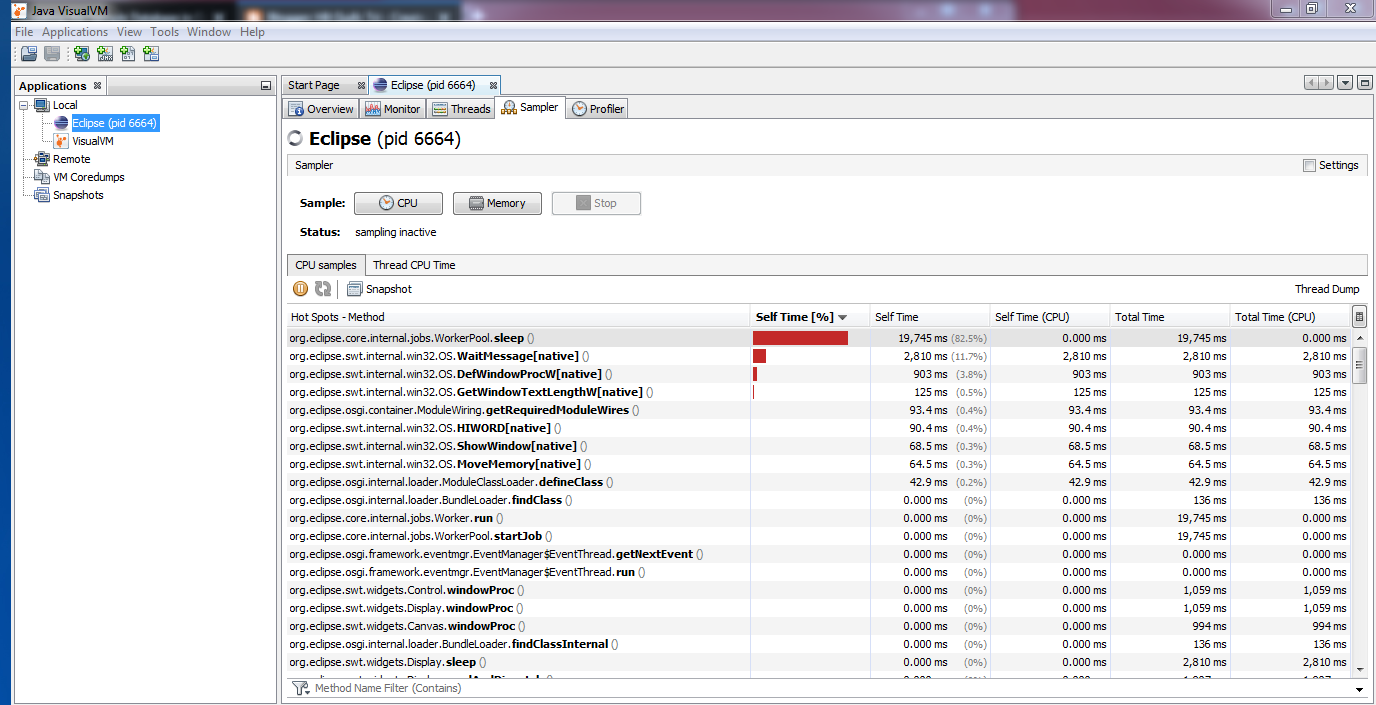
Java VisualVM help us monitor resource in Java Application as show performance.
To open Java VisualVM, following the step below:

1. Go to C:\Program Files\Java\<jdk version>\bin (Java JDK 64bit )or C:\Program Files (x86)\Java\<jdk version>\bin (Java JDK x86).
Note: This tool avaible from JDK 8 or older, JDK 9 is not avaible.
2. Find and open jvisualvm.exe
3. The Java VisualJM window display

Java VisualVM


+ From Application tab > Local: Show Java Applications are running.
Note: If you open Java VisualVM with current JDK version, there are only show the Java Applications that are running on this JDK.
+ Monitor: The Java VisualVM show the resources which the Java apps is used as memory, CPU, Network,...
+ Sampler tab (Useful): The Java VisualVM take a sampler about the resources of Java App. You can use take performance your app. You will be known exactly the java classes are taken performance.

[Java Design Pattern] [Creational Pattern] - Factory Method

May 09, 2018 |
Creational Pattern - Factory Method Pattern
Purpose: The Factory Method Pattern gives us a way encapsulate the instancetiation of concrete types. Instead you delcare new direct object, you use Factory class to create a new object.

Factory Method concept UML. (Source: Software Architecture Design Patterns in Java.pdf)


Example 1:


IVehicle
package com.designpattern.creational.factorymethod;

public interface IVehicle {
    void run();
}

Vehicle
package com.designpattern.creational.factorymethod;

public class Vehicle implements IVehicle {
   
    private String color;
   
    @Override
    public void run() {
        System.out.println("Not Run");
    }

    public String getColor() {
        return color;
    }

    public void setColor(String color) {
        this.color = color;
    }
}

Bike
package com.designpattern.creational.factorymethod;

public class Bike extends Vehicle {
   
    @Override
    public void run() {
        // TODO Auto-generated method stub
        System.out.println("Bike is running...");
    }

}

Car
package com.designpattern.creational.factorymethod;

public class Car extends Vehicle {

    @Override
    public void run() {
        // TODO Auto-generated method stub
        System.out.println("Car is running...");
    }
}

Motobike

package com.designpattern.creational.factorymethod;

public class Motobike extends Vehicle {
   
    @Override
    public void run() {
        // TODO Auto-generated method stub
        System.out.println("Motobike is running...");
    }
}

VechicleFactory
package com.designpattern.creational.factorymethod;

public class VehicleFactory {

    public static Vehicle createVehicle(String s) {
        Vehicle vehicle = null;
       
        if ("bike".equals(s)) {
            vehicle = new Bike();
        } else if ("motobike".equals(s)) {
            vehicle = new Motobike();
        } else if ("car".equals(s)) {
            vehicle = new Car();
        } else {
            vehicle = new Vehicle();
        }

        return vehicle;

    }
}

VehicleMain
package com.designpattern.creational.factorymethod;

public class VehicleMain {
    public static void main(String[] args) {
        Vehicle bike =   VehicleFactory.createVehicle("bike");
        bike.run();
      
        Vehicle motobike = VehicleFactory.createVehicle("motobike");
        motobike.run();
      
        Vehicle car = VehicleFactory.createVehicle("car");
        car.run();

    }
}

Result:
Bike is running...
Motobike is running...
Car is running...


[English] - Possessive adjective, Possessive Pronoun, Possessive Case.

April 28, 2018 |
 Ref: https://elight.edu.vn/tinh-tu-so-huu
I. Overview

Pronoun
Possessive Adj
Possessive Pronoun
I
My
Mine
You
Your
Your
He
His
His
She
Her
Hers
It
Its
Its
We
Our
Ours
They
Their
Theirs


 II. Possessive Case 
 1. 's or s'
      's: cho một chủ sở hữu
      s': cho nhiều sỡ hữu.

updating...

[Java] - Predicate Interface

April 27, 2018 |


Predicate Interface is a functional interface that represents a predicate of one argument and it is defined in java.util.function packages. That helps your code is simple.

Ref:
- https://docs.oracle.com/javase/8/docs/api/java/util/function/class-use/Predicate.html
- http://www.java2s.com/Tutorials/Java/java.util.function/Predicate/index.htm

1. Predicate example 1 

Predicate<Integer> pr = b -> (b >= 18); // Creating predicate  
System.out.println(pr.test(18));    // Calling Predicate method 

Results:
true

2. Predicate example 2 (Lambda and Method Reference)

Student.java
package com.javacore.stream;

public class Student {
 private String name;
 private int age;

 public Student(String name, int age) {
  super();
  this.name = name;
  this.age = age;
 }

 public String getName() {
  return name;
 }

 public void setName(String name) {
  this.name = name;
 }

 public int getAge() {
  return age;
 }

 public void setAge(int age) {
  this.age = age;
 }

 @Override
 public String toString() {
  // TODO Auto-generated method stub
  return "name = " + this.name + ";age= " + this.age;
 }

}

Main.java
package com.javacore.stream;

import java.util.ArrayList;
import java.util.Arrays;
import java.util.List;
import java.util.function.Predicate;

public class Main {

 public static void main(String[] args) {
   // create some student
  Student andy = new Student("andy", 25);
  Student susi = new Student("susi", 26);
  Student tom = new Student("tom", 24);
  Student adam = new Student("adam", 25);

  // create student list
  List<Student> studentList = Arrays.asList(andy, susi, tom, adam);
 
  //use Method Reference
  List<Student> studentOf25Age = filter(studentList, Main::isStudentAgeLessThan);
  System.out.println(studentOf25Age);
  
  //use lambda
  List<Student> studentOf26Age = filter(studentList, (Student student)  -> 26 == student.getAge());
  System.out.println(studentOf26Age);
 }

 public static boolean isStudentAgeLessThan(Student argStudent) {
  if (argStudent.getAge() < 25) {
   return true;
  }

  return false;
 }

 public static List<Student> filter(List<Student> argStudentList,
   Predicate<Student> argPredicate) {
  List<Student> studentList = new ArrayList<>();

  for (Student student : argStudentList) {
   if (argPredicate.test(student)) {
    studentList.add(student);
   }
  }

  return studentList;
 }

}


Results:
[name = tom;age= 24]
[name = susi;age= 26]

updating...


[Node.js] - About Node.js

April 12, 2018 |

[Microsoft Office] - Cách tạo video từ Microsoft Powerpoint 2016

April 12, 2018 |

Trong MS PowerPoint 2016 có chức năng tạo video từ các slide. Để tạo được một video các bạn làm như sau:

Bước 1: File > Export > Create a Video
Bước 2: Chọn chất lượng Video
Có 3 loại là:
+ Full HD (1080p)
+ HD (720p)
+ Standard (480p)


Bước 3: Chọn thời gian cho mỗi slide, mặc định là 5s. Các bạn có thể tuỳ chỉnh
Bước 4: Nhấn Create Video > Đặt tên file và chọn nơi lưu trữ video.
Bước 5: Chờ MS Powerpoint tạo video.

Sau khi chạy xong, các bạn sẽ có một file video với đuôi là .mp4


[Java Design Pattern] - Creational Patterns

April 04, 2018 |
Creational Patterns

  • Deal with one of the most commonly performance taks in an OO application, the creation of object.
  • Support a uniform, simple and controlled mechanism to create objects.
  • Allow the encapsulation of the details about what classes are instantiated and how these instances are created.
  • Encourage the use of interfaces, which reduces coupling.


1. Factory Method
Description: A client object does not know which class to instantiate, you can make use of the factory method to create a instance of an appropriate class from a class hierarchy or a family of related classes.
Ref: Factory Method

2. Singleton
Description:Sometimes, there may be a need to have one and only one instance of a given class druing the lifetime of an application.
Ref: Singletone

3. Abstract Factory
Description: updating...
Ref: updating...

4. Prototype
Description: updating...
Ref: updating...

5. Builder
Description: updating...
Ref: updating...


[English] - Comparison

February 23, 2018 |
I. Equality
Positive: S + V + as  adj/adv  as +  N/pronoun
Negative: S + V + not as adj/adv as + N/pronoun

II. Comparative
Short Adj: S + V + adj/adv_er + than + N
Long Adj: S + V + more adj/adv  + than + N

III. Superlative
Short Adj: S + V + the adj/adv _est + N
Long Adj: S + V + the most adj/adv + N

IV. Other
 * Cặp tính từ giống nhau
  s + v + adj + 'er' and adj + 'er'.
  s + v + more and more + adj.
Ex: 
My wife is more and more beatiful.
My work is harder and harder.

* Cặp tính tường khác nhau
- Chỉ khi hai sự vật hoặc sự việc thay đổi cùng cấp độ.
The + comparative + S1 + V1, the + comparative +  S1 +V1

Ex:  
The more difficult the task is, the sweeter it is to succeed.

* All the better : Càng tốt hơn
Ex: My wife is beautiful. I love her all the better when she feed the dog.

* Not.. any the comparative: chẳng hơn tí nào
Ex: He didn't any the more smart for hard examines.

* Not the comparative: chả khá hơn chút nào
Ex: He explained that but I was still none the more understand.

Note:
AdjSo sánh hơnSo sánh nhất
good/wellbetterbest
bad worseworst
little (amount)lessleast
little (size)smallersmallest
much / manymoremost
far (place + time)furtherfurthest
far (place)fartherfarthest
late (time)laterlatest
near (place)nearernearest
old (people and things)older/elderoldest/eldest

References:
https://www.dolenglish.vn/ielts-library/blogs/cau-truc-cang-cang
https://tienganhtflat.com/tatrunghoc/ngu-phap-so-sanh-kep