[React Native ] - All of things

May 29, 2020 |


React Native

==================================================================
BASIC


==================================================================
REACT REDUX 

1. Promise data in store


Data will be wrong. You can not access props.variable


==================================================================
1. Facebook Login

$ yarn add react-native-fbsdk-next
OR npm
$ npm install --save react-native-fbsdk-next

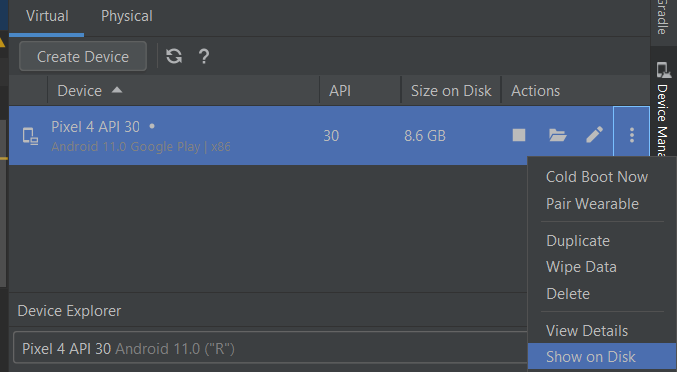
2. Change Emulated Performance - Graphics
- Go to Android > Show  on Disk:

- Open file : config.ini and edit below:
hw.gpu.enabled = yes
hw.gpu.mode = host  //Host: use Hardware 

or
hw.gpu.mode=software (or hardware)

3. How to resolve issue related FLAG_IMMUTABLE 
Decription: Strongly consider using FLAG_IMMUTABLE, only use FLAG_MUTABLE if some functionality depends on the PendingIntent being mutable, e.g. if it needs to be used with inline replies or bubbles.

4. Google SignIn SDK is failing by throwing error, A non-recoverable sign in failure occurred -catch error: React Native

Step 1: cd ./android && ./gradlew signingReport
Step 2: Copy  SHA1 of Task :app:signingReport, Variant: debugAndroidTest, Config: debug
Step 3: Update it the Firebase Console under Project Settings, Android app, add the SHA1


Update support email

Add fingerprint with step below


Step 4: Download the google-services.json, put it in ./android/app
Step 5: Go to Authentication, then Sign-in method, then press Google


Step 6: Take the Web client ID and use that for your GoogleSignin.configure({ webClientId: ... });
Step 7: This Web client ID should be the same as listed in https://console.developers.google.com/apis/credentials?project=<your_project_id> -> Credentials -> OAuth 2 Client ID -> Web Client

5. Check Realm DB Version for Compatible React Native


6. Enable Proguard
Run Proguard to shrink the Java bytecode in release builds.

edit in app/build.gradle
/**
 * Run Proguard to shrink the Java bytecode in release builds.
 */
def enableProguardInReleaseBuilds = true

It will be some error when enable this while run app. Add more to proguard-rules.pro :

# Add any project specific keep options here:
-keep class io.realm.**  { * ;  }
-keep class com.swmansion.reanimated.** { *; }
-keep class com.facebook.hermes.unicode.** { *; }
-keep class com.facebook.jni.** { *; }
-keep class com.facebook.react.turbomodule.** { *; }
-keep public class com.horcrux.svg.** {*;}


is updating...


[Java] - Spring Frame A -> Z

May 24, 2020 |


Spring Boot
================================================================
================================================================
Spring solution
================================================================
This article is collection of my experience about Spring. I usually update this when I learn new knowledge.


[ExtJS] A->Z

March 16, 2020 |
EXT JS
 Document: https://docs.sencha.com/extjs/7.1.0/

========================================================================
1. Grid
//create Grid Panel
var sm = Ext.create("Ext.grid.Panel) {...}
var me = sm.getCmp("<id of grid>"); // get grid component.
me.store.add(object); // object or json,... => add new row to Grid

//delete rows
var sml = me.getSelectionModel();
var rec = sml.getSelection()[0];
me.store.remove(rec);

//format data in cell.
Ext.create('Ext.grid.Grid', {
   title: 'tittle',
   store: Ext.data.StoreManager.lookup('sampleStore'),
   columns: [
    {text: 'Symbol', dataIndex: 'symbol', width: 100},
    {text: 'Price', dataIndex: 'price', width: 100, formatter: 'usMoney'},
    {text: 'Change', dataIndex: 'change', xtype: 'numbercolumn', format: '0.00', width: 100},
    {text: 'Change', dataIndex: 'change', xtype: 'numbercolumn', format: '0,000', width: 100},
    {text: 'Change', dataIndex: 'change', xtype: 'numbercolumn', format: '00.00%', width: 100},
   ],
})

//locked columns
add locked=true to columns.
{text: 'Change', dataIndex: 'change', xtype: 'numbercolumn', format: '0.00', width: 100, locked=true},
Ref: https://docs.sencha.com/extjs/4.1.1/extjs-build/examples/grid/locking-grid.html

//highlight a row in grid
// css
.your-selected-cls .x-grid-cell {
    background-color: red !important;
}

//js
var selNodes =  myExtGrid.getView().getSelectedNodes();
var r = Ext.get(selNodes[0]);
 
//remmove css
r.removeCls("your-selected-cls");

//add css
r.addCls("your-selected-cls");
Ref: https://forum.sencha.com/forum/showthread.php?230756-add-custom-background-color-to-individual-grid-row

//highlight a column in grid
// adding color to columns
 grid.columns[cellIndex].tdCls="your-selected-cls "; => put css there
grid.getView().refresh();

//merge two data value into one column in Grid.
{
   header: "Name",
   dataIndex: 'last_name',
   renderer: function(value, element, record) {
       return record.data['last_name'] + ', ' + record.data['first_name'];
   }
}


...is updating...

[Javascript/Jquery/CSS] - A->Z

March 14, 2020 |
JAVASCRIPT

Find element has <id> and change value itself.
document.getElementById("<id>").innerHTML = "Hello JavaScript";
document.getElementById("<id>").style.<attribute> = "<value>";
Function:
function myFunction() {
 // return with object
 return object;
}
function myFunction() {
  // void function
}
function function1 (parameter1, parameter2, parameter3) {
    // code to be executed
}
 Document:
 document.write(<value>);

Console / alert :
// we console useful for debug a script.
console.log(message);

//alert show message to user but sometime we can use debug script.alert(message);

 Object:
var person = {
    firstName: "John",
    lastName : "Doe",
    id       : 5566,
    fullName : function() {
         return this.firstName + " " + this.lastName;
  }

};

//access object 
person.firstName or person["firstName"];
 String method:
var str = "acb def abc";
str.length; // length no of String, value = 7
// returns the index of (the position of) the first occurrence of a specified textstr.indexOf("def"); //value = 4

//returns the index of the last occurrence of a specified textstr.lastIndexOf("abc"); // value = 8

// method searches a string for a specified value and returns the position of the match
str.search("def"); // value = 4

//extracts a part of a string and returns the extracted part in a new string.
str.slice(start_index, end_index);str.slice(7, 9); //value = abstr.slice(-9, -7); //value = ef

// extracts a part of a string and returns the extracted part in a new 
(NOT ACCEPTED negetive index)str.substring(start_index, end_index);Ex: str.substring(7, 9); //value = ab

// same slice but different second parameter is lengh of substring.str.substr(start, length);
Ex: str.substr(7, 2); //value = ab
str.replace(old string, new string); // Replace first search string
str.replaceAll(old string, new string); // Replacea all search string

str.toUpperCase();
str.toLowerCase(); 
str.concat("string1","string2");

Number methods:
isNaN(x); // check is number or not.

//returns a string, with the number written with a specified number of decimals
var x = 1.876;
x.toFixed(0);           // returns 2
x.toFixed(2);           // returns 1.88

//returns a string, with a number written with a specified length.
x.toPrecision();        // returns 1.876
x.toPrecision(2);       // returns 1.88
x.toPrecision(4);       // returns 1.876
x.toPrecision(6);       // returns 1.87600 

Number()  // Returns a number, converted from its argument.
parseFloat()  // Parses its argument and returns a floating point number
parseInt()  // Parses its argument and returns an integer
Collection (Array, Map):

var array= ["a", "b", 10];
var temp;
//accessarray[index];

//add element to arrayarray.push("Lemon");
for (i = 0; i < length of array; i++) {

}
//for each 1
array.forEach(myFunction);
function myFunction(value) {...} 
//for each 2
array.forEach({
   $(this) // element
});

//push()
var temp = ["a", "b"];
array.push(temp);

2. Detect select tab
<div id="tabDiv">
<ul>
<li><a href="#suspensionTab"><sm:msg code="Suspension_Activation_Replacement"/></a></li>
<li><a href="#terminationTab"><sm:msg code='Termination_Record_Master'/></a></li>
</ul>

<div id="suspensionTab">
<div id="terminationTab">
</div>

$('#tabDiv').click('tabsselect', function (event, ui) {
var activeTab = $('#tabDiv').tabs('option', 'active');
});

3. Getter/Setter in Javascript 
Ref: https://stackoverflow.com/questions/49895080/javascript-class-getter-setter
class Form{
  set foo(val){
    console.log("setting foo")
    this.fooValue = val;
  }
  
  get foo(){
     console.log("getting foo");
     return this.fooValue;
  }
}

let frm = new Form();
frm.foo = "bar";
console.log(frm.foo);

var form = {
  a: "aValue",
  b: "bValue"
}

function withGetterSetter(obj){
   var keys = Object.keys(obj);
   var result = {};
   
   for(var i=0;i<keys.length;i++){
       var key = keys[i];
       result[key+"_internal"] = obj[key];
       (function(k){
         Object.defineProperty(result,k, {
          get:function() {
            console.log("getting property:",k);
            return this[k + "_internal"];
          }, 
          set: function(x) { 
            console.log("setting property:",k);
            this[k + "_internal"] = x 
          }
         });
       })(key)
   }
   return result;
}

var setterObj = withGetterSetter(form);
console.log(setterObj.a);
setterObj.a = "updated";
console.log(setterObj.a);
4. Optional Chaining Operator

Directly use ?. inline to test for existence.
Ex: variable.properties1.properties2
if properties1 is null, the program will throw an undefined exception. Common, we usually check before used access.

if(variable.properties1 !==  undefined  && variable.properties1.properties2 !== undefined )

instead of we can use
variable.properties1?.properties2

Example:

const adventurer = {
  name: 'Alice',
  cat: {
    name: 'Dinah',
  },
};

const dogName = adventurer.dog?.name;
console.log(dogName);
// Expected output: undefined

console.log(adventurer.someNonExistentMethod?.());
// Expected output: undefined

5. Determine start date and end date of month
var date = new Date();
var firstDay = new Date(date.getFullYear(), date.getMonth(), 1);
var lastDay = new Date(date.getFullYear(), date.getMonth() + 1, 0);


=========================================================================
ExtJs
Example code: https://hoquoctri.blogspot.com/2020/03/extjs-z.html
Lib: https://docs.sencha.com/extjs/4.2.0/#!/api/Ext

1. Highlight a cell by Data Index Name
var js highlighCellEdit = function(dataIndexArr, rowIndex) {
     var me = SM.getCmp("gridPanel") :
     var record = Ext.get(me.getView() .getNode(rowIndex));
    //var column = me.getView().getGridColumns () [1]; // Get Cell DOM by Index
    for(var i = 0; i < dataIndexArr.length; i++) {
        var fname = me.down (' [dataIndex=' + dataIndexArr[i] + ']'); // Get cell DOM by Data Index
        var cell = me.getView().getCell(record, fname);
        cell.addCls("test");
    }
}


is updating...

=========================================================================
Regrex
 Tool check: https://www.regextester.com/104043
1. Validate email
var regrex = /(?:[01]\d|2[0123]):(?:[012345]\d):(?:[012345]\d)/;

2. Validate time
//hh:mm:ss
var regrex = /(?:[01]\d|2[0123]):(?:[012345]\d):(?:[012345]\d)/;


Ex:
  console.log("isCorrectTime 23:59:59 " + isCorrectTime("23:59:59")); => true
console.log("isCorrectTime 09:36:55 " + isCorrectTime("09:36:55")); => true
console.log("isCorrectTime 24:59:59" + isCorrectTime("24:59:59"));  =>f alse

3. Format Credit Card No:
Ex: 
1111222233334444
=> 111122******4444
 Regrex:   /(?<=\d{6})(\d+?)(?=\d{4})/g

1111222233334444
=> 1111-2222-3333-4444
 Regrex:   /(\d{4})(?=\d)/gm

111122******4444
=>1111-22**-****-4444
Regrex:  /\B(?=(\S{4})+(?!\S))/g

4. Mask by Jquery
Mask Transitions: The default available mask transitions are:

‘0’: {pattern: /\d/}
‘A’: {pattern: /[a-zA-Z0-9]/}
‘9’: {pattern: /\d/, optional: true}
‘S’: {pattern: /[a-zA-Z]/}
‘#’: {pattern: /\d/, recursive: true}

The value must match the digit of the pattern.
In this example: Credit card = 16 digit correctponding  16 of "0". 

$(".selector").mask('0000-0000-0000-0000-0000');
Mask Credit Card:  1111222233334444 => 1111-2222-3333-4444

4. Remove HTML tab
const regex = /<(?:.|\n)*?>/gm;
const result = htmlContent.replace(regex, '');

5. Encode URL
If your URL has a special character such as #, ? ,... you should encode your url and decode in another side.

let uri = "car=sa#ab###";
let encoded = encodeURIComponent(uri);
let decoded = decodeURIComponent(encoded);

6. Array includes()

const fruits = ["Banana", "Orange", "Apple", "Mango"];
fruits.includes("Mango"); // return true if existed

7. Jquery: Disable/Enable Select Box in HTML

$('#verifiedYN').removeAttr('disabled');
$('#actionType').attr('disabled', 'disabled');

// Get text from Select Box
$('#id').find(":selected").text();

//Get value from Select Box
$('#id').find(":selected").val();

#Check/Unchecked
$('.myCheckbox').prop('checked', true);
$('.myCheckbox').prop('checked', false);

#Select in SelectBox
$("#MySelectBox").val("5");

7. Get/Set value from <span>

$("#submittername").text("testing"); //get & set
$("#submittername").html("testing <b>1 2 3</b>");

8. Set img src
$("#my_image").attr("src","second.jpg");


is updating...


[Algorithm] - Linear search and Binay Search

December 10, 2019 |
1. Linear search
Time:
- Worst: O(n)
- Average:
- Best:

Code:
public class LinearSearchExample {
   
    private static int[] a = {1000, 11, 50, 1, 2, 3, 78, 100, 101, 102, 1000, 1000};
   
    public static void main(String[] args) {
        int x = 1000;
        int count = 0;
       
        for (int i = 0; i < a.length; i++) {
            if (a[i] == x) {
                count++;
            }
        }
       
        if (count == 0) {
            System.out.println("not found");
        } else {
            System.out.println("Match results: " + count);
        }
    }
}

2. Binary search
Time:
- Worst:O (log n)
- Average:
- Best:

Code:
public class BinarySearchExample {

    // sorted array
    private static int[] a = { 10, 21, 23, 54, 61, 72 };

    public static void main(String[] args) {
        int x = 10;

        // sort array
        int left = 0;
        int right = a.length;
        int mid;
        while (left <= right) {
            mid = (left + right - 1) / 2;

            if (a[mid] == x) {
                System.out.println("Found " + x + " in array.");
                break;
            } else if (a[mid] < x) {
                left = mid + 1;
            } else {
                right = mid - 1;
            }
        }

    }
}

[AJAX, JQUERY] - AJAX & JQUERY Collection

November 19, 2019 |

AJAX/JQUERY


I. AJAX Basic
function loadDoc() {
    var xhttp = new XMLHttpRequest();

    xhttp.onreadyStatechange = function() {
        if (this.readyState==4 && this.status == 200) {
          
            // this.responseText: response data from url.
            // $.parseJSON(data): parse string to JSON data.
      
            var jsonData = $.parseJSON(this.responseText);
          
            // $('.class'): addressed class in HTML.
            // $('#id'): addressed id in HTML.
            // $('#id').text(data): set data to this ID or class.
            // $('#id').append(data): append data to this ID or class.
            $('.full-name').text(jsonData.full_name);
            $('#full-name').text(jsonData.full_name);
            $('.full-name').append(jsonData.full_name);
          
            //clear data
            top.$('.full-name').text("");
        }
    };
  
    xhttp.open("GET", "url", true);
    xhttp.setRequestHeader("Content-type", "application/json");
    xhttp.send;  
}

AJAX-Jquery:
$.ajax({
 url: <url>,
 type: <GET, POST, PUT,...>,
 async: <true, false>,
 dataType: <text, json,xml,...>,
 data: { //paramter for sending....
 },
 success:function(data, status, xhr) {
  //get data here
 }
 
 
});

Ex:
var test = ajax(); // test maybe doesn't have value because of async = true,
funtion ajax(){
 .....
 async: true,
 .....
 success:function(data, status, xhr) {
  return data;
 }
}
var test = ajax(); //test will be have data.
funtion ajax(){
 var result;
 var response = $.ajax({
  url: <url>,
  type: <GET, POST, PUT,...>,
  async: false,
  dataType: <text, json,xml,...>,
  data: { //paramter for sending....
  },
  success:function(data, status, xhr) {
   //get data here
   result = data;
  }
 });
 
 if (result) {
  return result;
 }
}
=========================================================================
JQUERY
#clear elements
$("elements").remove();

#remove value on form
$("#form_ID").trigger('reset');

// set checked of Selection box
#(element).prop("checked", true/false);


Oracle-PL/SQL

October 29, 2019 |
Oracle-PL/SQL
1. Check Oracle performance

-- check defragment of table
select table_name,avg_row_len,round(((blocks*16/1024)),2)||'MB' "TOTAL_SIZE",
round((num_rows*avg_row_len/1024/1024),2)||'Mb' "ACTUAL_SIZE",
round(((blocks*16/1024)-(num_rows*avg_row_len/1024/1024)),2) ||'MB' "FRAGMENTED_SPACE",
(round(((blocks*16/1024)-(num_rows*avg_row_len/1024/1024)),2)/round(((blocks*16/1024)),2))*100 "percentage"
from all_tables WHERE table_name='SC_QST_MAIN';

-- analyze index
analyze index SCC_I18N.IDX_QST_MAIN validate structure;

--gather statstic
exec DBMS_STATS.GATHER_TABLE_STATS (ownname => '"SCC_I18N"', tabname => '"SC_QST_MAIN"', estimate_percent => 1);

-- check response time of database
SET LINESIZE 200 PAGESIZE 50000
    COL BEGIN_TIME FORMAT A17
    COL END_TIME FORMAT A17
    COL INST_ID FORMAT 999
    COL "Response Time (msecs)" FORMAT 999,999,999,999.99

    SELECT TO_CHAR (BEGIN_TIME, 'DD-MON-YYYY HH24:MI') BEGIN_TIME,
         TO_CHAR (END_TIME, 'DD-MON-YYYY HH24:MI') END_TIME,
         INST_ID,
         ROUND (VALUE * 10, 2) "Response Time (msecs)"
    FROM GV$SYSMETRIC
    WHERE     1 = 1
         AND METRIC_NAME = 'SQL Service Response Time'
    ORDER BY INST_ID;

-- explain sql statement
explain plan for select count(user_key) from sc_qst_main where  reg_dt >= TO_DATE('20190421000000', 'YYYYMMDDHH24MISS') AND user_key = '2803115653';
select * from table(dbms_xplan.display);

[Tips] - Windows tips

September 22, 2019 |


 I) How to remove something from right click context menu windows 10
 Sometime, Context menu in right  click has many items and long line. we should remove some item that you not use long time or frequently.
1. Go to Run or Window + R
2. Type 'regedit'
3. Go to Computer\HKEY_CLASSES_ROOT\*\shellex\ContextMenuHandlers
4. Choose programs which you want to disable menu.
5. Change default value to -{hex code}.
Ex:
Before: {A94757A0-0226-426F-B4F1-4DF381C630D3}
After: -{A94757A0-0226-426F-B4F1-4DF381C630D3}

Video ref:


 2. Folder/File not refresh

Ref: https://superuser.com/questions/390030/explorer-does-not-auto-refresh

Refer to Windows 7 does not refresh folder views on Microsoft Answers and Windows Explorer doesn't refresh when moving/deleting. Several posters stated that the issue pertains to the Windows UI Shell and several solutions exist:

  • Remove a "Network Connection" that points to a server that is not currently available.
  • Disable the Client for Microsoft Networks in properties of Local Area Connection.
  • Or simply going through Control Panel -> Folder Options -> View, then click 'Reset Folders'.

Let me know if these links help you out!