[SQL] - Aggregate SQL Server

May 25, 2018 |

This article just note the SQL script in the work progress.

1. Drop INDEX
* SQL Server
-- Check a index is existing or not before drop it.
IF EXISTS (SELECT * FROM sys.indexes WHERE  object_id = OBJECT_ID(N'<table_name') AND name = N'<index_name>'))
    DROP INDEX <index_name> ON <table_name>

2. Drop TABLE
* SQL Server 
-- check a table is existing or not before drop it.
IF EXISTS (SELECT * FROM sys.tables WHERE object_id = OBJECT_ID(N'table_name'))
    DROP TABLE <table_name>

3. Drop COLUMN
* SQL Server 
-- drop a column if its doesn't has any contraint.
IF EXISTS (Select 1 From sys.columns Where name = '<column_name>' And object_id = OBJECT_ID('<table_name>'))
BEGIN
  ALTER TABLE <table_name> DROP COLUMN <column_name>;
END

-- drop a column if its has contraints.
IF EXISTS (Select 1 From sys.columns Where name = '<column_name>' And object_id = OBJECT_ID('<table_name>'))
BEGIN
  DECLARE @def varchar(256);
  SELECT @def = name FROM sys.default_constraints WHERE parent_object_id = OBJECT_ID('<table_name>') AND COL_NAME(parent_object_id, parent_column_id) = '<column_name>';

  if @def is not null
  EXEC('ALTER TABLE <table_name> DROP CONSTRAINT ' + @def);

  ALTER TABLE <table_name> DROP COLUMN <column_name>;
END


4. Drop CONSTRAINT
* SQL Server 
--drop a contraint
ALTER TABLE <table_name> DROP CONSTRAINT <constraint_name>

-- Check a column is contraint on a table. If its exist, drop and create contraint.
IF NOT EXISTS (SELECT 1 FROM INFORMATION_SCHEMA.TABLE_CONSTRAINTS AS C JOIN INFORMATION_SCHEMA.KEY_COLUMN_USAGE AS K
ON C.TABLE_NAME = K.TABLE_NAME AND C.CONSTRAINT_CATALOG = K.CONSTRAINT_CATALOG AND C.CONSTRAINT_SCHEMA = K.CONSTRAINT_SCHEMA
AND C.CONSTRAINT_NAME = K.CONSTRAINT_NAME WHERE C.CONSTRAINT_TYPE = 'PRIMARY KEY' AND K.COLUMN_NAME = '<column_name>'
and K.TABLE_NAME = '<table_name>')
BEGIN
    declare @pkey varchar(50);
    SELECT top 1 @pkey=c.CONSTRAINT_NAME FROM INFORMATION_SCHEMA.TABLE_CONSTRAINTS AS C JOIN INFORMATION_SCHEMA.KEY_COLUMN_USAGE AS K
    ON C.TABLE_NAME = K.TABLE_NAME AND C.CONSTRAINT_CATALOG = K.CONSTRAINT_CATALOG AND C.CONSTRAINT_SCHEMA = K.CONSTRAINT_SCHEMA
    AND C.CONSTRAINT_NAME = K.CONSTRAINT_NAME WHERE C.CONSTRAINT_TYPE = 'PRIMARY KEY' and K.TABLE_NAME = '<table_name>'

    if(@pkey is not null)
        exec('ALTER TABLE <table_name> DROP CONSTRAINT ' + @pkey);
    else
        set @pkey='pk_<table_name>';

    exec('ALTER TABLE <table_name> ADD CONSTRAINT ' + @pkey + ' PRIMARY KEY CLUSTERED (column_name_1, column_name_2,.., column_name_n) WITH (FILLFACTOR = 80)');
END

-- rename column_1 to column_2 and make them a part of primary key
IF EXISTS (SELECT 1 FROM sys.columns WHERE name = 'column_1' AND object_id = OBJECT_ID('table_1'))
BEGIN
  DECLARE @pk_name varchar(300);
  SELECT @pk_name = name FROM sysobjects WHERE xtype = 'PK' AND parent_obj = (object_id('table_1'));

  if @pk_name is not null
    exec('ALTER TABLE table_1 DROP CONSTRAINT ' + @pk_name);
  else
    SET @pk_name='pk_table_1';
 
  EXEC sp_rename 'table_1.column_1', 'column_2', 'COLUMN';
 
  exec('ALTER TABLE table_1 ADD CONSTRAINT ' + @pk_name + ' PRIMARY KEY CLUSTERED (column_1, column_2,..., column_n) WITH (FILLFACTOR = 80)');
END


Updating...

[Tools] - Java VisualVM

May 12, 2018 |


Java VisualVM help us monitor resource in Java Application as show performance.
To open Java VisualVM, following the step below:

1. Go to C:\Program Files\Java\<jdk version>\bin (Java JDK 64bit )or C:\Program Files (x86)\Java\<jdk version>\bin (Java JDK x86).
Note: This tool avaible from JDK 8 or older, JDK 9 is not avaible.
2. Find and open jvisualvm.exe
3. The Java VisualJM window display

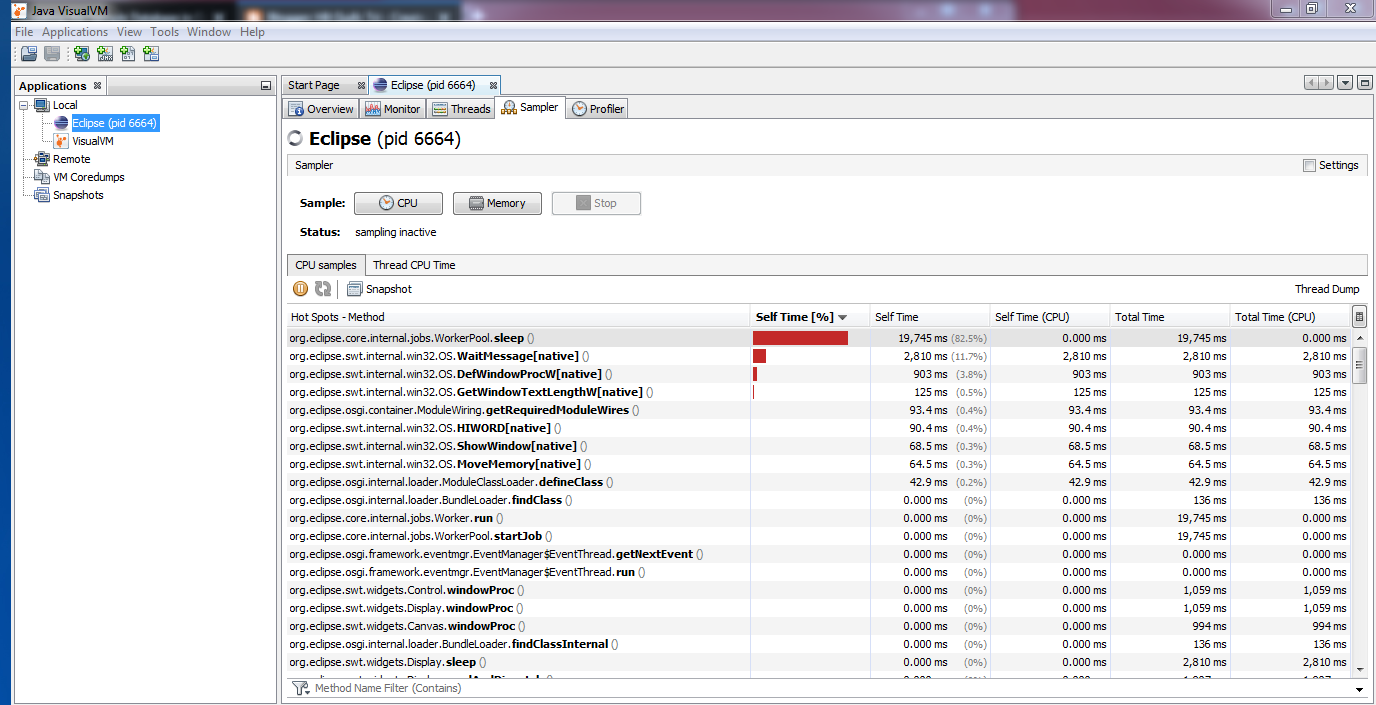
Java VisualVM


+ From Application tab > Local: Show Java Applications are running.
Note: If you open Java VisualVM with current JDK version, there are only show the Java Applications that are running on this JDK.
+ Monitor: The Java VisualVM show the resources which the Java apps is used as memory, CPU, Network,...
+ Sampler tab (Useful): The Java VisualVM take a sampler about the resources of Java App. You can use take performance your app. You will be known exactly the java classes are taken performance.

[Java Design Pattern] [Creational Pattern] - Factory Method

May 09, 2018 |
Creational Pattern - Factory Method Pattern
Purpose: The Factory Method Pattern gives us a way encapsulate the instancetiation of concrete types. Instead you delcare new direct object, you use Factory class to create a new object.

Factory Method concept UML. (Source: Software Architecture Design Patterns in Java.pdf)


Example 1:


IVehicle
package com.designpattern.creational.factorymethod;

public interface IVehicle {
    void run();
}

Vehicle
package com.designpattern.creational.factorymethod;

public class Vehicle implements IVehicle {
   
    private String color;
   
    @Override
    public void run() {
        System.out.println("Not Run");
    }

    public String getColor() {
        return color;
    }

    public void setColor(String color) {
        this.color = color;
    }
}

Bike
package com.designpattern.creational.factorymethod;

public class Bike extends Vehicle {
   
    @Override
    public void run() {
        // TODO Auto-generated method stub
        System.out.println("Bike is running...");
    }

}

Car
package com.designpattern.creational.factorymethod;

public class Car extends Vehicle {

    @Override
    public void run() {
        // TODO Auto-generated method stub
        System.out.println("Car is running...");
    }
}

Motobike

package com.designpattern.creational.factorymethod;

public class Motobike extends Vehicle {
   
    @Override
    public void run() {
        // TODO Auto-generated method stub
        System.out.println("Motobike is running...");
    }
}

VechicleFactory
package com.designpattern.creational.factorymethod;

public class VehicleFactory {

    public static Vehicle createVehicle(String s) {
        Vehicle vehicle = null;
       
        if ("bike".equals(s)) {
            vehicle = new Bike();
        } else if ("motobike".equals(s)) {
            vehicle = new Motobike();
        } else if ("car".equals(s)) {
            vehicle = new Car();
        } else {
            vehicle = new Vehicle();
        }

        return vehicle;

    }
}

VehicleMain
package com.designpattern.creational.factorymethod;

public class VehicleMain {
    public static void main(String[] args) {
        Vehicle bike =   VehicleFactory.createVehicle("bike");
        bike.run();
      
        Vehicle motobike = VehicleFactory.createVehicle("motobike");
        motobike.run();
      
        Vehicle car = VehicleFactory.createVehicle("car");
        car.run();

    }
}

Result:
Bike is running...
Motobike is running...
Car is running...


[English] - Possessive adjective, Possessive Pronoun, Possessive Case.

April 28, 2018 |
 Ref: https://elight.edu.vn/tinh-tu-so-huu
I. Overview

Pronoun
Possessive Adj
Possessive Pronoun
I
My
Mine
You
Your
Your
He
His
His
She
Her
Hers
It
Its
Its
We
Our
Ours
They
Their
Theirs


 II. Possessive Case 
 1. 's or s'
      's: cho một chủ sở hữu
      s': cho nhiều sỡ hữu.

updating...

[Java] - Predicate Interface

April 27, 2018 |


Predicate Interface is a functional interface that represents a predicate of one argument and it is defined in java.util.function packages. That helps your code is simple.

Ref:
- https://docs.oracle.com/javase/8/docs/api/java/util/function/class-use/Predicate.html
- http://www.java2s.com/Tutorials/Java/java.util.function/Predicate/index.htm

1. Predicate example 1 

Predicate<Integer> pr = b -> (b >= 18); // Creating predicate  
System.out.println(pr.test(18));    // Calling Predicate method 

Results:
true

2. Predicate example 2 (Lambda and Method Reference)

Student.java
package com.javacore.stream;

public class Student {
 private String name;
 private int age;

 public Student(String name, int age) {
  super();
  this.name = name;
  this.age = age;
 }

 public String getName() {
  return name;
 }

 public void setName(String name) {
  this.name = name;
 }

 public int getAge() {
  return age;
 }

 public void setAge(int age) {
  this.age = age;
 }

 @Override
 public String toString() {
  // TODO Auto-generated method stub
  return "name = " + this.name + ";age= " + this.age;
 }

}

Main.java
package com.javacore.stream;

import java.util.ArrayList;
import java.util.Arrays;
import java.util.List;
import java.util.function.Predicate;

public class Main {

 public static void main(String[] args) {
   // create some student
  Student andy = new Student("andy", 25);
  Student susi = new Student("susi", 26);
  Student tom = new Student("tom", 24);
  Student adam = new Student("adam", 25);

  // create student list
  List<Student> studentList = Arrays.asList(andy, susi, tom, adam);
 
  //use Method Reference
  List<Student> studentOf25Age = filter(studentList, Main::isStudentAgeLessThan);
  System.out.println(studentOf25Age);
  
  //use lambda
  List<Student> studentOf26Age = filter(studentList, (Student student)  -> 26 == student.getAge());
  System.out.println(studentOf26Age);
 }

 public static boolean isStudentAgeLessThan(Student argStudent) {
  if (argStudent.getAge() < 25) {
   return true;
  }

  return false;
 }

 public static List<Student> filter(List<Student> argStudentList,
   Predicate<Student> argPredicate) {
  List<Student> studentList = new ArrayList<>();

  for (Student student : argStudentList) {
   if (argPredicate.test(student)) {
    studentList.add(student);
   }
  }

  return studentList;
 }

}


Results:
[name = tom;age= 24]
[name = susi;age= 26]

updating...


[Node.js] - About Node.js

April 12, 2018 |

[Microsoft Office] - Cách tạo video từ Microsoft Powerpoint 2016

April 12, 2018 |

Trong MS PowerPoint 2016 có chức năng tạo video từ các slide. Để tạo được một video các bạn làm như sau:

Bước 1: File > Export > Create a Video
Bước 2: Chọn chất lượng Video
Có 3 loại là:
+ Full HD (1080p)
+ HD (720p)
+ Standard (480p)


Bước 3: Chọn thời gian cho mỗi slide, mặc định là 5s. Các bạn có thể tuỳ chỉnh
Bước 4: Nhấn Create Video > Đặt tên file và chọn nơi lưu trữ video.
Bước 5: Chờ MS Powerpoint tạo video.

Sau khi chạy xong, các bạn sẽ có một file video với đuôi là .mp4


[Java Design Pattern] - Creational Patterns

April 04, 2018 |
Creational Patterns

  • Deal with one of the most commonly performance taks in an OO application, the creation of object.
  • Support a uniform, simple and controlled mechanism to create objects.
  • Allow the encapsulation of the details about what classes are instantiated and how these instances are created.
  • Encourage the use of interfaces, which reduces coupling.


1. Factory Method
Description: A client object does not know which class to instantiate, you can make use of the factory method to create a instance of an appropriate class from a class hierarchy or a family of related classes.
Ref: Factory Method

2. Singleton
Description:Sometimes, there may be a need to have one and only one instance of a given class druing the lifetime of an application.
Ref: Singletone

3. Abstract Factory
Description: updating...
Ref: updating...

4. Prototype
Description: updating...
Ref: updating...

5. Builder
Description: updating...
Ref: updating...


[English] - Comparison

February 23, 2018 |
I. Equality
Positive: S + V + as  adj/adv  as +  N/pronoun
Negative: S + V + not as adj/adv as + N/pronoun

II. Comparative
Short Adj: S + V + adj/adv_er + than + N
Long Adj: S + V + more adj/adv  + than + N

III. Superlative
Short Adj: S + V + the adj/adv _est + N
Long Adj: S + V + the most adj/adv + N

IV. Other
 * Cặp tính từ giống nhau
  s + v + adj + 'er' and adj + 'er'.
  s + v + more and more + adj.
Ex: 
My wife is more and more beatiful.
My work is harder and harder.

* Cặp tính tường khác nhau
- Chỉ khi hai sự vật hoặc sự việc thay đổi cùng cấp độ.
The + comparative + S1 + V1, the + comparative +  S1 +V1

Ex:  
The more difficult the task is, the sweeter it is to succeed.

* All the better : Càng tốt hơn
Ex: My wife is beautiful. I love her all the better when she feed the dog.

* Not.. any the comparative: chẳng hơn tí nào
Ex: He didn't any the more smart for hard examines.

* Not the comparative: chả khá hơn chút nào
Ex: He explained that but I was still none the more understand.

Note:
AdjSo sánh hơnSo sánh nhất
good/wellbetterbest
bad worseworst
little (amount)lessleast
little (size)smallersmallest
much / manymoremost
far (place + time)furtherfurthest
far (place)fartherfarthest
late (time)laterlatest
near (place)nearernearest
old (people and things)older/elderoldest/eldest

References:
https://www.dolenglish.vn/ielts-library/blogs/cau-truc-cang-cang
https://tienganhtflat.com/tatrunghoc/ngu-phap-so-sanh-kep

[Tips] - Clean Up PC

February 21, 2018 |
Purpose: When your PC overload disk space, we need to increase disk space. Some tips below help we increase disk space.

I. Disk Cleanup
You can use Disk Cleanup to reduce the number of unnecessary files on your drives, which can help your PC run faster. It can delete temporary files and system files, empty the Recycle Bin, and remove a variety of other items that you might no longer need. The option to cleanup updates helps reduce the size of the component store.

Step by steps:
1. Go to Disk CleanUp tool
2. Choose system driver (C) at Disk CleanUp : Drive Selection 
3. Choose all files to delete
4. Click OK to clean disk
5. Go to Disk CleanUp Tool again
6. Choose Clean up to system files
7. Click OK to clean disk.

Disk Cleanup tool helps your PC save about 5-6GB.

II. Task Scheduler
The StartComponentCleanup task was created in Windows 8 to regularly clean up components automatically when the system is not in use. This task is set to run automatically when triggered by the operating system. When run automatically, the task will wait at least 30 days after an updated component has been installed before uninstalling the previous versions of the component.

Step by step:
1. Go to Task Scheduler (Window + R > type "Taskschd.msc" OR Control Panel > Administrative Tool > Task Scheduler)
2. Expand Task Scheduler Library > Microsoft > Window > Servicing
3. Under Start Component Cleanup and click Run

Start Component Cleanup
III. Dism.exe
The /Cleanup-Image parameter of Dism.exe provides advanced users more options to further reduce the size of the WinSxS folder.

From an elevated command prompt, type the following:
Dism.exe /online /Cleanup-Image /StartComponentCleanup

IV. Hibernate Files
We will remove Hibernate file in system. It usually occupied about >= 1GB.
From an elevated command prompt, type the following:
powercfg -h  off

V. Turn Off Virtual Memory
If PC's physical memory enough large and you don't need Virtual Memory, you can turn off Virtual Memory so that save disk space.

Step by steps:
1. Go to Advantage System Setting.
2. Advanced tab > choose Setting... button at Performance.
3. Choose Advanced tab at  Performance Options window.
4. Click Change... button at Virtual Memory.
5. Choose system drive (C) > Choose No Paging File > OK.
6. The system requires restarting> Restart Now.

[Java] - The Nashorn Engine

February 19, 2018 |
Oracle Nashorn Engine is used interpreter JavaScript language. The scenario for Oracle Nashorn Engine as a command-line tool and embedded interpreter in Java Applications.
Note: Oracle Nashorn Engine be able to SE 9.

I. It's just javascript.
Example 1:

------------helloWorld.js------------
//start
var hello = function() {
      print("Hello Oracle Nashorn Engine");
};
helloworld();
//end
------------helloWorld.js------------

Evaluating it as simple as this:
$jjs helloWorld.js
Hello Oracle Nashorn Engine

Example 2:
------------helloWorld.js------------
//start
var sum = function (a, b) {
    return a + b;
};
print("Sum = " +  sum(3,4));
//end
------------helloWorld.js------------

Evaluating it as simple as this:
$jjs helloWorld.js
Sum = 7

II. Embedding Oracle Nashorn
Oracle Nashorn from a Java application to define javascript statements, call it as we write code in a javascript file. It helps when we want to load a javascript code to Oracle Nashorn and work on that.

Example:
package learning.javacore.oraclenashsorn.samples;

import javax.script.ScriptEngine;
import javax.script.ScriptEngineManager;
import javax.script.ScriptException;

public class Sample1 {

private static final String NASHORN_ENGINE = "nashorn";

public static void main(String[] args) {

//declared ScriptEngineManager and ScriptEngine
ScriptEngineManager engineMrg = new ScriptEngineManager();
ScriptEngine engine = engineMrg.getEngineByName(NASHORN_ENGINE);

//declared a js codes.
String js = "var sum = function(a,b) { return a + b;};";

try {
engine.eval(js);
System.out.println(engine.eval("sum(3,4);"));
} catch (ScriptException e) {
}
}
}

We can do more with Oracle Nashorn. Please see details: http://www.oracle.com/technetwork/articles/java/jf14-nashorn-2126515.html