[Java] - Thread A->Z

December 16, 2025 |


Thread


==========================================================================

Thread

Thread Circle:


==============================

Virtual Thread

Ref : 

https://docs.oracle.com/en/java/javase/21/core/virtual-threads.html#GUID-DC4306FC-D6C1-4BCC-AECE-48C32C1A8DAA

Virtual threads are lightweight threads that reduce the effort of writing, maintaining, and debugging high-throughput concurrent applications.

A platform thread is implemented as a thin wrapper around an operating system (OS) thread. A platform thread runs Java code on its underlying OS thread, and the platform thread captures its OS thread for the platform thread's entire lifetime. Consequently, the number of available platform threads is limited to the number of OS threads

Virtual Thread:
- A virtual thread is also an instance of java.lang.Thread..
- A virtual thread isn't tied to a specific OS thread.
- Virtual threads are implemented in a similar way to virtual memory.

Why Use Virtual Threads:
- Use virtual threads in high-throughput concurrent applications, especially those that consist of a great number of concurrent tasks that spend much of their time waiting.
- Virtual threads are not faster threads.


[Java Core] - hashCode method

June 26, 2019 |

hashCode()
       A hash code is a integer number which puts instance of a class into a finite number of categories.
When you override equals(), you are also expected to override hashCode() method because the hashcode is used when storing the object as a key in a maps. the has code was  used in Collection as HashMap, HashTable, HashSet.
There are 4 points when override hashMap().
-  When equals() was override, hashCode must be override too.
-  The result of hashCode must be not change. This mean that you shoudn't include the variable usually change or not unique
-  If equals() return true when called with two objects, Java program call hashCode() on each of those object must return the same result.
- If equals() return false when called with two objects, calling hashCode() on each of those object doesn't have return a different result.

Example: Not Override hashCode()

public class Card {
    private String rank;
    private String suit;
    public Card(String r, String s) {
        if (r == null || s == null) {
            throw new IllegalArgumentException("arg1,arg2 are null.");
        }
       
        rank = r;
        suit = s;
    }

    @Override
    public String toString() {
        return "rank:" + this.rank + " suit: " + this.suit;
    }

    @Override
    public boolean equals(Object obj) {
        if ( !(obj instanceof Card)) return false;
        Card c = (Card) obj;
        return rank.equals(c.rank) && suit.equals(c.suit);
    }
   
}


public class HashCodeTest {

    /**
     * @param args the command line arguments
     */
    public static void main(String[] args) {
        // TODO code application logic here
        Card card1 = new Card("1", "1");
        Card card2 = new Card("1", "1");
       
        Set<Card> cardList = new HashSet<>();
        cardList.add(card1);
        cardList.add(card2);
       
        System.out.println(cardList);
       
    }
   
}


Result: 
run:
[rank:1 suit: 1, rank:1 suit: 1]
BUILD SUCCESSFUL (total time: 0 seconds)

Example: Override hashCode()
Add block code to Card class
    @Override
    public int hashCode() {
        return rank.hashCode();
    }


Result:
run:
[rank:1 suit: 1]
BUILD SUCCESSFUL (total time: 0 seconds)


[Java Core] - Access Modifiers

February 12, 2019 |
Access Modifiers

The Access Modifiers is a important part of Encapsulation in OOP. It will be limited access data from outside.


Modifier Class Package Subclass Other Classes
Private Yes No No No
No modifier Yes Yes No No
Protected Yes Yes Yes No
Public Yes Yes Yes Yes

Example:

Example about access mofifiers


Download source code: Access Modifier
Source references:
1. https://stackify.com/oop-concept-for-beginners-what-is-encapsulation/


[Java] - Encode/Decode Base64 String

July 14, 2018 |


I. Encode image to base64 string
 Convert an image to base64 string so that send via SOAP Message, RESTFul or save to database.

Codes:
 public String encodeToString(BufferedImage image, String type) {
        String imageString = null;
        ByteArrayOutputStream bos = new ByteArrayOutputStream();

        try {
            ImageIO.write(image, type, bos);
            byte[] imageBytes = bos.toByteArray();

            BASE64Encoder encoder = new BASE64Encoder();
            imageString = encoder.encode(imageBytes);

            //imageString = Base64.getEncoder().encodeToString(imageBytes);

            bos.close();
        } catch (IOException e) {
            e.printStackTrace();
        }
        return imageString;
    }


II. Decode base64 string to image
 Decode base64 sring to image so that display on UI or other.

Codes:
 private BufferedImage decodeToImage(String imageString) {
        BufferedImage image = null;
        byte[] imageByte;
        try {
            BASE64Decoder decoder = new BASE64Decoder();
            imageByte = decoder.decodeBuffer(imageString);

            //imageByte = Base64.getDecoder().decode(imageString);
            ByteArrayInputStream bis = new ByteArrayInputStream(imageByte);
            image = ImageIO.read(bis);
            bis.close();
        } catch (Exception e) {
            LOGGER.err(e.toString());
            return null;
        }
      
        return image;
    }


Updating...

[Java] - Predicate Interface

April 27, 2018 |


Predicate Interface is a functional interface that represents a predicate of one argument and it is defined in java.util.function packages. That helps your code is simple.

Ref:
- https://docs.oracle.com/javase/8/docs/api/java/util/function/class-use/Predicate.html
- http://www.java2s.com/Tutorials/Java/java.util.function/Predicate/index.htm

1. Predicate example 1 

Predicate<Integer> pr = b -> (b >= 18); // Creating predicate  
System.out.println(pr.test(18));    // Calling Predicate method 

Results:
true

2. Predicate example 2 (Lambda and Method Reference)

Student.java
package com.javacore.stream;

public class Student {
 private String name;
 private int age;

 public Student(String name, int age) {
  super();
  this.name = name;
  this.age = age;
 }

 public String getName() {
  return name;
 }

 public void setName(String name) {
  this.name = name;
 }

 public int getAge() {
  return age;
 }

 public void setAge(int age) {
  this.age = age;
 }

 @Override
 public String toString() {
  // TODO Auto-generated method stub
  return "name = " + this.name + ";age= " + this.age;
 }

}

Main.java
package com.javacore.stream;

import java.util.ArrayList;
import java.util.Arrays;
import java.util.List;
import java.util.function.Predicate;

public class Main {

 public static void main(String[] args) {
   // create some student
  Student andy = new Student("andy", 25);
  Student susi = new Student("susi", 26);
  Student tom = new Student("tom", 24);
  Student adam = new Student("adam", 25);

  // create student list
  List<Student> studentList = Arrays.asList(andy, susi, tom, adam);
 
  //use Method Reference
  List<Student> studentOf25Age = filter(studentList, Main::isStudentAgeLessThan);
  System.out.println(studentOf25Age);
  
  //use lambda
  List<Student> studentOf26Age = filter(studentList, (Student student)  -> 26 == student.getAge());
  System.out.println(studentOf26Age);
 }

 public static boolean isStudentAgeLessThan(Student argStudent) {
  if (argStudent.getAge() < 25) {
   return true;
  }

  return false;
 }

 public static List<Student> filter(List<Student> argStudentList,
   Predicate<Student> argPredicate) {
  List<Student> studentList = new ArrayList<>();

  for (Student student : argStudentList) {
   if (argPredicate.test(student)) {
    studentList.add(student);
   }
  }

  return studentList;
 }

}


Results:
[name = tom;age= 24]
[name = susi;age= 26]

updating...


[Java] - The Nashorn Engine

February 19, 2018 |
Oracle Nashorn Engine is used interpreter JavaScript language. The scenario for Oracle Nashorn Engine as a command-line tool and embedded interpreter in Java Applications.
Note: Oracle Nashorn Engine be able to SE 9.

I. It's just javascript.
Example 1:

------------helloWorld.js------------
//start
var hello = function() {
      print("Hello Oracle Nashorn Engine");
};
helloworld();
//end
------------helloWorld.js------------

Evaluating it as simple as this:
$jjs helloWorld.js
Hello Oracle Nashorn Engine

Example 2:
------------helloWorld.js------------
//start
var sum = function (a, b) {
    return a + b;
};
print("Sum = " +  sum(3,4));
//end
------------helloWorld.js------------

Evaluating it as simple as this:
$jjs helloWorld.js
Sum = 7

II. Embedding Oracle Nashorn
Oracle Nashorn from a Java application to define javascript statements, call it as we write code in a javascript file. It helps when we want to load a javascript code to Oracle Nashorn and work on that.

Example:
package learning.javacore.oraclenashsorn.samples;

import javax.script.ScriptEngine;
import javax.script.ScriptEngineManager;
import javax.script.ScriptException;

public class Sample1 {

private static final String NASHORN_ENGINE = "nashorn";

public static void main(String[] args) {

//declared ScriptEngineManager and ScriptEngine
ScriptEngineManager engineMrg = new ScriptEngineManager();
ScriptEngine engine = engineMrg.getEngineByName(NASHORN_ENGINE);

//declared a js codes.
String js = "var sum = function(a,b) { return a + b;};";

try {
engine.eval(js);
System.out.println(engine.eval("sum(3,4);"));
} catch (ScriptException e) {
}
}
}

We can do more with Oracle Nashorn. Please see details: http://www.oracle.com/technetwork/articles/java/jf14-nashorn-2126515.html


[Java] - The diferrence ==, equals

January 22, 2018 |
What is the difference between " ==" operator, .equals() and compare().

1. The difference == and .equals method

+ The == operator use for reference compare (Address Compare).
+ The .equals method use content comparison.

Example:
        String helloWorld = new String("HELLO");
        String helloWorld1 = new String("HELLO");
      
        String s1 = "HELLO";
        String s2 = "HELLO";
        System.out.println(helloWorld == helloWorld1);
        System.out.println(helloWorld.equals(helloWorld1));
      
        System.out.println(s1 == s2);
        System.out.println(s1.equals(s2)); 


Results:
false
true
true
true


[Java] - Exception & Loging

December 16, 2017 |

Before Java SE 7 or 8, we don't have any way manage a resource object (BufferReader, FileReader,... ). We must manage them by manually. Sometime, we forget close a resource and make memory leak, low performance. In Java SE 7, 8, 9, we have a way manage them by automatically.

Overview
Within JVM has two types: Check and Uncheck.
- Check exception at compile time.
- Unchecked exception at runtime.
 Error exception cannot catch like: OutOfMemoryError,...


Statement:
    try {
                //body
            } catch (Exception ex) {
                // exception code
            } finally {
                // final code
      }


Handle UncatchException

======
private void start() {
        Thread.setDefaultUncaughtExceptionHandler((Thread t, Throwable e) -> {
            System.out.println("Woa! there was an exception thrown somewhere! " + t.getName() + ": " + e);
        });
        final Random random = new Random();
        for (int j = 0; j < 10; j++) {
            int divisor = random.nextInt(4);
            System.out.println("200 / " + divisor + " Is " + (200 / divisor));
        }
    }
======
    private void startForCurrentThread() {
        Thread.currentThread().setUncaughtExceptionHandler((Thread t, Throwable e) -> {
            System.out.println("In this thread " + t.getName() + " an exception was thrown " + e);
        });
        Thread someThread = new Thread(() -> {
            System.out.println(200 / 0);
        });
        someThread.setName("Some Unlucky Thread");
        someThread.start();
        System.out.println("In the main thread " + (200 / 0));
    }

I. try-with-resource statement
 try-with-resource statement

try (Resource resource 1;
      Resource resourcce 2) {
}

In Java SE 6 with Resource Management.
        // Java SE 6 or later
        BufferedReader bufferReader1 = null;
        try {
            bufferReader1 = new BufferedReader(new FileReader("Test.txt"));
            System.out.println(bufferReader1.readLine());
        } catch (Exception e) {
            // TODO: handle exception
        } finally {
            try {
                bufferReader1.close();
            } catch (IOException e) {
                // TODO Auto-generated catch block
                e.printStackTrace();
            }
        }


 In Java SE 7 or later with Resource Management.
         // Java SE 7 & 8
        try (BufferedReader bufferReader2 = new BufferedReader(new FileReader("Test.txt"))) {
            System.out.println(bufferReader2.readLine());
        } catch (IOException e) {
            // TODO Auto-generated catch block
            e.printStackTrace();
        }


II. Create a new Resource
 When you create a resource class that use to try-with-resource, those class must be implement close method  from java.lang.AutoCloseable .

Example:
ReadFile.java
package javaone.core.learning;

import java.io.BufferedReader;
import java.io.FileReader;
import java.io.IOException;

public class ReadFile implements AutoCloseable {
    private BufferedReader buff;
    private FileReader fileReader;

    public void printContentOfFile(String path) {
        try {
            fileReader = new FileReader(path);
            buff = new BufferedReader(fileReader);
            String line = buff.readLine();
            System.out.println(line);
            while (line != null) {
                System.out.println(line);
                line = buff.readLine(); 
            }
        } catch (IOException e) {
            e.printStackTrace();
        }
    }

    /** {@inheritDoc} */
    @Override
    public void close() throws Exception {
        buff.close();
        System.out.println("Close Read File");
    }
}

MainTest.java
public static void main(String[] args) {
         // test new Resource
        System.out.println("test new Resource");
        try (ReadFile readFile = new ReadFile();) {
            readFile.printContentOfFile("Test.txt");
        } catch (Exception e) {
            System.out.println();
        }
    }

Result:
test new Resource
Try With Resource line 1
Try With Resource line 2
Try With Resource line 3
Try With Resource line 4
Try With Resource line 5
Close Read File 


When the point jump out try-with-resource statement, the resource auto close ReadFile resource. We don't need to manually close resource.

[Java Swing] - How to create a Menu Bar in Java UI.

November 29, 2017 |

Note: Some resources I get from Oracle: https://docs.oracle.com/javase/tutorial/uiswing/components/menu.html

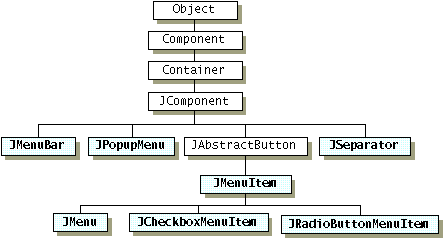
Before create a menu in Java UI, we need to know the menu component hierarchy as below:


We must be created three objects: JMenuBar, JMenuItem, JMenu.
This section I use WindowBuilder tool on Eclipse Market.My purpose is convenience on control UI but I think you should handle fundamental about Java UI before use tool.

I. Install WindowBuilder

1. Go to menu bar > Help > Eclipse Market
2. Search "WindowBuilder" keyword
3. Choose WindowBuilder x.x.x and install it.
4. Project > New > WindowBuilder > Swing Designer > Application Window

II. Examples About Menu on Java UI.

 1. Create simple menu

MenuOneDemo.java

package com.parentralcontrol.ui;

import java.awt.EventQueue;

import javax.swing.JFrame;
import javax.swing.JMenu;
import javax.swing.JPanel;
import javax.swing.JMenuBar;
import javax.swing.JMenuItem;

/**
 * DESCRIPTION GOES HERE<br>
 * @author Tri Ho
 * @created Oct 28, 2017
 * @version $Revision$
 */
public class MenuOneDemo {

    private JFrame frmSimpleMenu;

    /**
     * Launch the application.
     */
    public static void main(String[] args) {
        EventQueue.invokeLater(new Runnable() {
            public void run() {
                try {
                    MenuOneDemo window = new MenuOneDemo();
                    window.frmSimpleMenu.setVisible(true);
                } catch (Exception e) {
                    e.printStackTrace();
                }
            }
        });
    }

    /**
     * Create the application.
     */
    public MenuOneDemo() {
        initialize();
    }

    /**
     * Initialize the contents of the frame.
     */
    private void initialize() {
        frmSimpleMenu = new JFrame();
        frmSimpleMenu.setTitle("Simple Menu 1");
        frmSimpleMenu.setBounds(100, 100, 450, 300);
        frmSimpleMenu.setDefaultCloseOperation(JFrame.EXIT_ON_CLOSE);
        frmSimpleMenu.getContentPane().setLayout(null);
       
        JPanel panel = new JPanel();
        panel.setBounds(0, 0, 434, 55);
        frmSimpleMenu.getContentPane().add(panel);
        panel.setLayout(null);
        

        //create a menu bar
        JMenuBar menuBar = new JMenuBar();
        menuBar.setBounds(0, 0, 97, 21);
        panel.add(menuBar);
        

        //create  main menu
        JMenu menu1 = new JMenu("Menu1");
        JMenu menu2 = new JMenu("Menu3");


        //add menu to menu bar
        menuBar.add(menu1);
        menuBar.add(menu2);
        

        // create menu item
        JMenuItem menuItem1 = new JMenuItem("Menu Item 1");
        JMenuItem menuItem2 = new JMenuItem("Menu Item 2");
        JMenuItem menuItem3 = new JMenuItem("Menu Item 3");
        JMenuItem menuItem4 = new JMenuItem("Menu Item 4");
       
        menu1.add(menuItem1);
        menu1.add(menuItem2);
        menu1.add(menuItem3);
        menu2.add(menuItem4);
    }
}

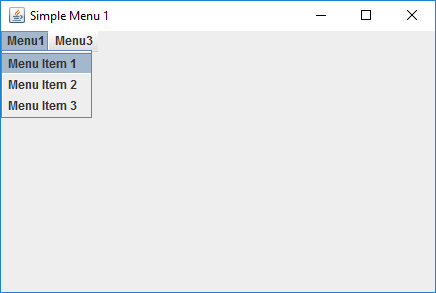
Results: